
vue 判断数组是否为空
array !==undefined && array.length > 0页面跳转时,传递参数中含有? = &等特殊字符
若传递参数中含有=,?,&等特殊字符 无法正常传递参数 则需要进行编码解码
传递时使用
encodeURIComponent()接收时使用
decodeURIComponent()箭头函数的this指向问题
this在运行时确定,即指向函数调用对象,除非利用call、apply等方法改变this指向。
箭头函数的this指向于函数作用域所在的对象
vat that = this;
uni.f({
	success: res=> {
		console.log(this);
	},
	fail: function (res) {
		console.log(that);
	}
});

//错误函数和成功函数打印结果一致
计时器
设置
//选择适合需求的定时器
this.timer = setTimeout( () => {
    // 这里添加您的逻辑
}, 1000)
this.timer = setInterval( () => {
    // 同上
}, 1000)
关闭
onUnload() {
	if(this.timer) {
		clearTimeout(this.timer);
		this.timer = null;
	}
}
vue2语法 (粗略)
<view title="hhhh"></view>
<view v-bind:title="t1"></view>// 动态绑定标签属性
<view v-bind:title="t1 + ‘hh’"></view>// 动态绑定标签属性

<input v-modal:value="title’"></input>// 双向动态绑定标签属性  title值改吧 value也改变
let和var定义对象
let遇到xianform表单特性
<template>
    <view>
        <form v-on:submit="submit">

            <view>
                <input type="text" name="username" ><input/>
    		</view>
            <button form-type="submit" type="primary" ></button>
        </form>
    </view>
</template>
<script>
	export default {
        data() 	{
            return {

            }
        },
        methods : {
            submit(e) {
                console.log(e.details.value.username)
            }
        }
    }
</script>
计算属性
<script>
	export default {
        data() 	{
            return {

            }
        },
        methods : {

        }
        computed : {
        	compute() {

        	}
        }
    }
</script>
组件注册
在uni-app工程根目录下的 components 目录,创建并存放自定义组件:
│─components            	符合vue组件规范的uni-app组件目录
│  └─componentA         	符合‘components/组件名称/组件名称.vue’目录结构,easycom方式可直接使用组件
│  		└─componentA.vue    可复用的componentA组件
│ └─component-a.vue 可复用的component-a组件- 全局注册
uni-app 支持配置全局组件,需在 main.js 里进行全局注册,注册后就可在所有页面里使用该组件。
	import Vue from 'vue'
	import pageHead from './components/page-head.vue'
Vue.component('page-head',pageHead)- 局部注册
传统vue规范
	<!-- 在index.vue引入 uni-badge 组件-->
	<template>
		<view>
			<uni-badge text="1"></uni-badge><!-- 3.使用组件 -->
		</view>
	</template>
	<script>
		import uniBadge from '@/components/uni-badge/uni-badge.vue';//1.导入组件(这步属于传统vue规范,但在uni-app的easycom下可以省略这步)
		export default {
			components:{uniBadge }//2.注册组件(这步属于传统vue规范,但在uni-app的easycom下可以省略这步)
		}
</script>通过uni-app的easycom: 将组件引入精简为一步。只要组件安装在项目的 components 目录下,并符合 components/组件名称/组件名称.vue 目录结构。就可以不用引用、注册,直接在页面中使用。
父向子属性传递props
props 可以是数组或对象,用于接收来自父组件的数据。props 可以是简单的数组,或者使用对象作为替代,对象允许配置高级选项,如类型检测、自定义验证和设置默认值。
	<template>
		<view>
			<!-- 我是子组件componentA -->
			<view>{{age}}</view>
            <view>{{list}}</view>
            <view>{{Obj}}</view>
		</view>
	</template>
	<script>
		export default {
			props: {
				// 检测类型 + 其他验证
				age: {
					type: Number,
					default: 0,
					required: true,
					validator: function(value) {
						return value >= 0
					}
				},
                list : {
                    type : Array,
                    default() : {
                    	return []// 数组或者对象 使用方法返回
                	}
                }
        		Obj: {
            		type : Oject,
                    default() : {
                        return {name : "sds", age : "12"}
                    }
        		}
			}
		}
	</script>
子向父属性传递emit
	<template>
		<view>
			<!-- 我是子组件componentA -->
			<view>
                <input type="text" placeholder="请输入。。。" @input="oninput"
			</view>

		</view>
	</template>
	<script>
		export default {
			name : "test",
            data(){

            },
            methods : {
                oninput(e) {
                    console.log(e.detail.value)
                    this.$emit("mytext",“test”)
                }
            }
		}
</script> <template>
<view>
<!-- 我是父组件componentB -->
<test title="123",@mytext="onMyText" , @click.native=”onClick“></test>
<!-- 原生事件绑定函数-->
</view>
</template>
<script>
export default {
name : "test",
data(){
},
methods : {
onMyText(e) {
console.log(e)
}
}
}
</script>//结果
打印了一次次文本框输入
打印了一次“test"子组件不允许修改父组件传过来的值, 因为该值为响应式数据
只能通过emit将值传给父组件,再传进子组件 来实现
sync修饰符和update修饰符
简化子组件传递父组件的过程
<!-- 父组件 -->
	<template>
		<view>
			<syncA :title.sync="title"></syncA>
            <!--省略一个更新事件 update:title="onUpdateTitle"-->
		</view>
	</template>
	<script>
		export default {
			data() {
				return {
					title:"hello vue.js"
				}
			}
            methods : {
            	   <!--省略一个更新事件 -->
            	<!--onUpdateTitle(e) {-->
                <!--    this.title = e;-->
                <!--}-->

            }


		}
</script><!-- 子组件 -->
<template>
<view>
<view @click="changeTitle">{{title}}</view>
</view>
</template>
<script>
export default {
props: {
title: {
default: "hello"
},
},
methods:{
changeTitle(){
<!--触发一个更新事件 必须带上修饰符-->
this.$emit('update:title',"uni-app")
}
}
}
</script>css样式只在当前生效
在使用Vue-Cli 开发时,我们都知道,在组件的<style></style>加上 scoped属性,可以让<style></style>里的样式只在当前组件生效。异步改为同步方法 以表单校验为例
// async表示为异步方法
async validateForm()	 {
				var validateFlag = true
                // await表示 后面接Promise对象
				await this.$refs.personInfo.validate().then(res=>{
					console.log('表单数据信息:', res);
				}).catch(err =>{
					console.log('表单错误信息:', err);
					validateFlag = false
				})
				await this.$refs.companyInfo.validate().then(res=>{
					console.log('表单数据信息:', res);
				}).catch(err =>{
					console.log('表单错误信息:', err);
					validateFlag = false
				})

				return validateFlag;

			},

                // 提交时得到验证结果
                submit :function(e){
                    this.validateForm().then(res=> {
                        console.log('validateForm:', res);
                    })
                }
promise
Promise 是一个构造函数,new Promise() 可以得到一个 Promise 实例对象,它是一个异步操作,可以用来执行一些异步操作(异步操作不能直接 return 接收执行结果,只能通过回调来接收)
const fs = require('fs')

function getFile(file_path) {
    var promise = new Promise(function (resolve, reject) {
        fs.readFile(file_path, 'utf-8', (err, resp) => {
            if (err) return reject(err)     // 失败的回调

            // 成功的回调
            resolve(resp)
        })
    })

    return promise
}

var p = getFile('./files/1.txt')

// 预先指定回调
p.then(function(resp) {
    // 执行成功
    console.log('执行成功:', resp)
}, function(err) {
    // 执行失败
    console.log('执行失败:', err)
})
Vue不能检测通过数组索引直接修改一个数组项
原因:由于JavaScript的限制,Vue不能检测数组和对象的变化
解决办法:
this.$set(arr,index,newVal)uniapp API
生命周期
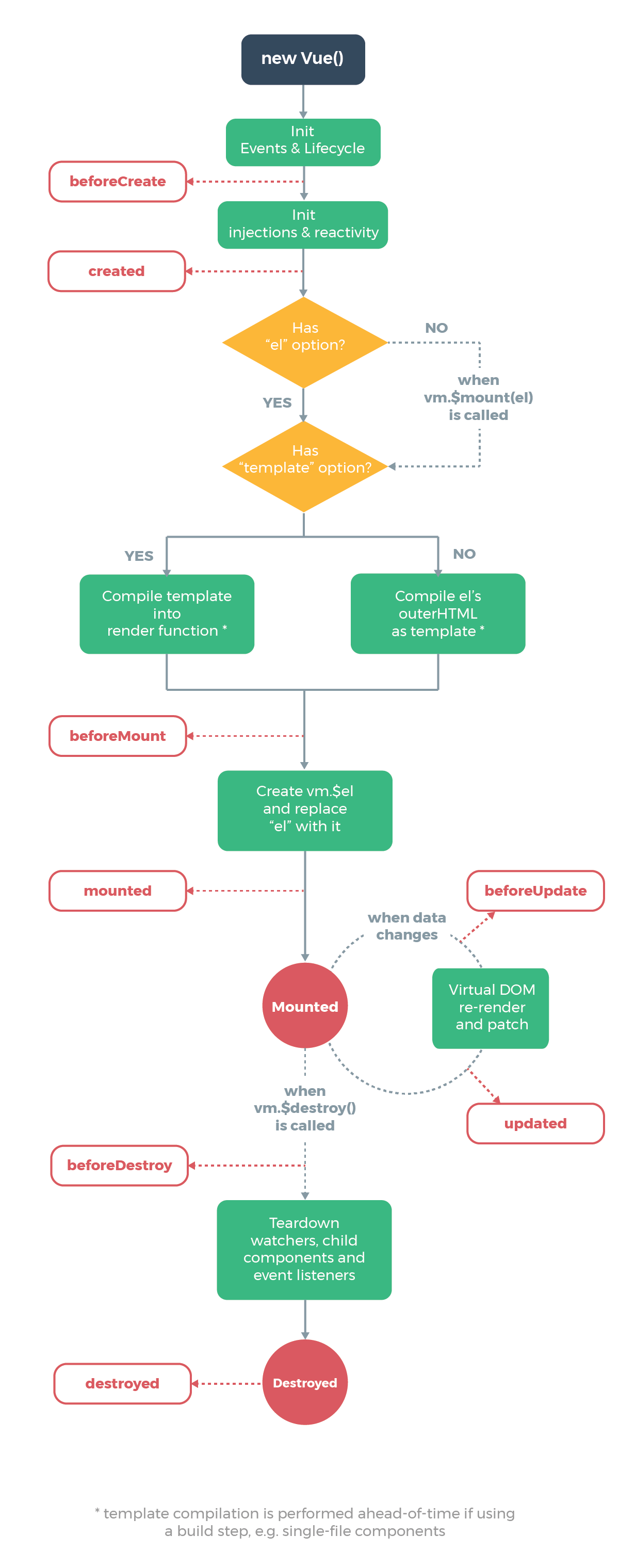
页面生命周期
| 函数名 | 说明 | 平台差异说明 | 最低版本 |
|---|---|---|---|
| onInit | 监听页面初始化,其参数同 onLoad 参数,为上个页面传递的数据,参数类型为 Object(用于页面传参),触发时机早于 onLoad | 百度小程序 | 3.1.0+ |
| onPullDownRefresh | 监听用户下拉动作,一般用于下拉刷新,参考示例 | ||
| onReachBottom | 页面滚动到底部的事件(不是scroll-view滚到底),常用于下拉下一页数据。具体见下方注意事项 |
页面跳转及参数
//在起始页面跳转到test.vue页面并传递参数
uni.navigateTo({
	url: 'test?id=1&name=uniapp'
});// 在test.vue页面接受参数
export default {
onLoad: function (option) { //option为object类型,会序列化上个页面传递的参数
console.log(option.id); //打印出上个页面传递的参数。
console.log(option.name); //打印出上个页面传递的参数。
console.log(getCurrentPage())//获取当前页面栈
}
<!--小程序不支持-->
onMounted() {
console.log(this.$routh.query.name); //打印出上个页面传递的参数。
}
}交互反馈
uni.showToast({
	title: '标题',
	duration: 2000,
    mask : true, //防止触摸穿透
});uni.showLoading({
title: '加载中'
});
//显示 loading 提示框, 需主动调用 uni.hideLoading 才能关闭提示框。uni.showModal({
title: '提示',
content: '这是一个模态弹窗',
success: function (res) {
if (res.confirm) {
console.log('用户点击确定');
} else if (res.cancel) {
console.log('用户点击取消');
}
}
});uni.showActionSheet({
itemList: ['A', 'B', 'C'],
success: function (res) {
console.log('选中了第' + (res.tapIndex + 1) + '个按钮');
},
fail: function (res) {
console.log(res.errMsg);
}
});
//从底部向上弹出操作菜单tabbar 设置iconfont字体图标
iconfont优先于iconpath
// pages.json
{
  "tabBar": {
    "iconfontSrc":"static/iconfont.ttf",
    "list": [
      {
        "pagePath": "pages/index/index",
        "text": "Tab1",
        "iconfont": {
          "text": "\ue102",
          "selectedText": "\ue103",
          "fontSize": "17px",
          "color": "#000000",
          "selectedColor": "#0000ff"
        }
      }
    ]
  }
}
网络请求
uni.request({
    url: `https://www.example.com/request$/{1}`, //仅为示例,并非真实接口地址。 可动态拼接
    data: {
        text: 'uni.request' // 自动拼接参数
    },
    header: {
        'custom-header': 'hello' //自定义请求头信息
    },
    success: (res) => {
        console.log(res.data);
        this.text = 'request success';
    },
    fail: (res) => {

        this.text = 'request fail';
    },
    complete: (res) => {

        this.text = 'request complete';
    }
});
数据缓存
uni.setStorage({
	key: 'storage_key',
	data: 'hello',
	success: function () {
		console.log('success');
	}
});uni.getStorage({
key: 'storage_key',
success: function (res) {
console.log(res.data);
}
});通常使用同步方法 getXxxSync setXxxSync
CSS语法粗略
- position
static 即没有定位
fixed 元素的位置相对于浏览器窗口是固定位置。
relative 相对其正常位置
absolute 相对于最近的已定位父元素- padding
一个元素的内边距区域指的是其内容与其边框之间的空间 参数顺序:上右下左
- margin
margin 属性为给定元素设置所有四个(上下左右)方向的外边距属性。也就是 margin-top,margin-right,margin-bottom,和 margin-left 四个外边距属性设置的简写。
- white-space
处理元素中的空白
nowrap 和 normal 一样,连续的空白符会被合并。但文本内的换行无效
- display: -webkit-box;
	display: -webkit-box; /*弹性伸缩盒子模型显示*/
	overflow: hidden;
	-webkit-box-orient: vertical; /*排列方式*/
-webkit-line-clamp: 2; /*显示文本行数(这里控制多少行隐藏)*/- align-items
align-items 属性将所有直接子节点上的 align-self 值设置为一个组
Flexbox 和 CSS 网格布局支持此属性- 文本溢出
// 整体效果为   "Is there any tea on t....."
overflow: hidden  ;//元素溢出时所需的行为 此处为隐藏
white-space: nowrap;//设置如何处理元素中的空白   此处为换行无效,可制文本在一行内显示
text-overflow: ellipsis;//  “溢出”事件的发生后行为,前提为上面两个属性   ci'chu显示省略号
word-break: break-all;//怎样在单词内断行。 此处为整个单词断行- 文本居中
// 垂直居中
height : 10px;
line-height : 10px ;
//水平居中
text-align: center
微信小程序
获取微信公众号二维码 接口 参数为微信号