
vitepress 指南
官方文档:VitePress
站点配置
基础站点信息
title、titleTemplate、description、lang
添加头部(图标、字体...)
export default defineConfig({
    // 添加站点图标
    head: [
    	['link', { rel: 'icon', href: '/favicon.ico' }]
    ]
})
主题配置
最后更新时间
export default defineConfig({
    lastUpdated: true
})
启用自定义主题
创建一个 .vitepress/theme/index.js 来作为主题的入口文件,此时 VitePress 将会使用自定义主题而不再是默认主题,请将主题作为默认导出来导出。
// 可以直接在主题入口导入 Vue 文件
// VitePress 已预先配置 @vitejs/plugin-vue
import Layout from './Layout.vue'

export default {
  Layout,
  enhanceApp({ app, router, siteData }) {
    // ...
  }
}
自定义 CSS
可以通过覆盖根级别的 CSS 变量来自定义默认主题的 CSS
import DefaultTheme from 'vitepress/theme'
import './custom.css'

export default DefaultTheme
在 .vitepress/theme/custom.css 添加你想要的自定义 CSS,例如主题色和主页渐变色
/* 主题色 */
:root {
  --vp-c-brand-1: #ff9456;
  --vp-c-brand-2: #ff792c;
  --vp-c-brand-3: #ff660d;
}

.dark {
  --vp-c-brand-1: #fec458;
  --vp-c-brand-2: #ffb62f;
  --vp-c-brand-3: #fca70a;
}

:root {
  /* hero标题渐变色 */
  --vp-home-hero-name-color: transparent;
  --vp-home-hero-name-background: -webkit-linear-gradient(
    120deg,
    #DDF44F,
    #FCC45B
  );

  /*hero logo背景渐变色 */
  --vp-home-hero-image-background-image: linear-gradient(
    -45deg,
    #DDF44F 50%,
    #FCC45B 50%
  );
  --vp-home-hero-image-filter: blur(40px);
}
自定义组件
在 .vitepress/theme/Components 定义组件 MyComponent.vue
<template>
  <div>
    MyComponent
  </div>
</template>
全局注册
import DefaultTheme from 'vitepress/theme'
import MyComponent from '.vitepress/theme/Components/MyComponent.vue'

export default {
  extends: DefaultTheme,
  enhanceApp({ app }) {
    // 注册自定义全局组件
    app.component('MyComponent', MyComponent)
  }
}
使用插槽扩展默认布局
默认主题的 <Layout/> 组件有一些插槽,能够被用来在页面的特定位置注入内容。
在自定义布局中使用插槽
如下将一个组件注入到 outline 之前
.vitepress/theme/index.js
import DefaultTheme from 'vitepress/theme'
import MyLayout from './MyLayout.vue'

export default {
  extends: DefaultTheme,
  // 使用注入插槽的包装组件覆盖 Layout
  Layout: MyLayout
}
.vitepress/theme/MyLayout.vue
<script setup>
import DefaultTheme from 'vitepress/theme'

const { Layout } = DefaultTheme
</script>

<template>
  <Layout>
    <template #aside-outline-before>
    </template>
  </Layout>
</template>
渲染函数使用插槽
import { h } from 'vue'
import DefaultTheme from 'vitepress/theme'
import MyComponent from './MyComponent.vue'

export default {
  extends: DefaultTheme,
  Layout() {
    return h(DefaultTheme.Layout, null, {
      'aside-outline-before': () => h(MyComponent)
    })
  }
}
可用插槽
默认主题布局的全部可用插槽如下:
- 当
layout: 'doc'(默认) 在 frontmatter 中被启用时:doc-topdoc-bottomdoc-footer-beforedoc-beforedoc-aftersidebar-nav-beforesidebar-nav-afteraside-topaside-bottomaside-outline-beforeaside-outline-afteraside-ads-beforeaside-ads-after
- 当
layout: 'home'在 frontmatter 中被启用时:home-hero-beforehome-hero-info-beforehome-hero-infohome-hero-info-afterhome-hero-actions-before-actionshome-hero-actions-afterhome-hero-imagehome-hero-afterhome-features-beforehome-features-after
- 当
layout: 'page'在 frontmatter 中被启用时:page-toppage-bottom
- 当未找到页面 (404) 时:
not-found
- 总是启用:
layout-toplayout-bottomnav-bar-title-beforenav-bar-title-afternav-bar-content-beforenav-bar-content-afternav-screen-content-beforenav-screen-content-after
搜索
minisearch
VitePress 支持 minisearch 浏览器内索引进行模糊全文搜索
import { defineConfig } from 'vitepress'

export default defineConfig({
  themeConfig: {
    search: {
      provider: 'local'
    }
  }
})
vitepress-plugin-search
npm i vitepress-plugin-search -D --legacy-peer-deps
npm i flexsearch -D
增加配置 config.ts
import { SearchPlugin } from "vitepress-plugin-search";
import { defineConfig } from "vitepress";
export default defineConfig({
  vite: { plugins: [SearchPlugin(options)] }
});
vitepress-plugin-pagefind
安装插件 vitepress-plugin-pagefind
npm i vitepress-plugin-pagefind pagefind增加配置 config.ts
import { defineConfig } from 'vitepress'
import { pagefindPlugin } from 'vitepress-plugin-pagefind'

export default defineConfig({
  vite: {
    plugins: [pagefindPlugin()],
  }
})
自动生成侧边栏
生成侧边栏示例
安装插件 vitepress-sidebar,该插件会使 frontmatter 的 aside 字段失效
npm i -D vitepress-sidebar增加配置 config.ts
官网提供两种自动生成侧边栏的方式:
withSidebar和generateSidebar。下面以generateSidebar方式示例
import { generateSidebar } from 'vitepress-sidebar';

export default defineConfig({
  themeConfig: {
    // 侧边栏配置
    sidebar: generateSidebar({
        // 侧边栏根目录
        documentRootPath: '/',
        // 指定一个指向文件夹的链接,导航文件夹中的 index.md
        useFolderLinkFromIndexFile: true,
        // 根据md文件的order进行排序
        sortMenusByFrontmatterOrder: true,
        // 排序之后将不是文件夹的放后面
        sortFolderTo: "top",
        // 菜单展开功能
        collapsed: false,
    }),
  }
});
侧边栏缩进
Vitepress 默认从第二层开始缩进,为了更容易地看到子内容所在组的第一级层次结构。
在 custom.css 文件中添加以下内容:
.group:has([role='button']) .VPSidebarItem.level-0 .items {
  padding-left: 16px !important;
  border-left: 1px solid var(--vp-c-divider);
  border-radius: 2px;
  transition: background-color 0.25s;
}
多侧边栏
当 URL 位于 /guide 页面时, 用户希望菜单仅显示 guide 的子菜单, 隐藏 config 的子菜单。
同样, 当 guide 位于 /config 页面时, 您希望隐藏 guide 的子菜单。
可以参考以下配置
import { generateSidebar } from 'vitepress-sidebar';

export default defineConfig({
  themeConfig: {
    // 侧边栏配置
    sidebar: generateSidebar([
      {
        // 侧边栏根目录
        documentRootPath: '/',
        // 指定一个指向文件夹的链接,导航文件夹中的 index.md
        useFolderLinkFromIndexFile: true,
        // 根据md文件的order进行排序
        sortMenusByFrontmatterOrder: true,
        // 排序之后将不是文件夹的放后面
        sortFolderTo: "top",
        // 菜单展开功能
        collapsed: false,
      },{
        documentRootPath: '/',
        scanStartPath: 'guide',
        basePath: '/guide/',
        resolvePath: '/guide/',
        useFolderLinkFromIndexFile: true,
        sortMenusByFrontmatterOrder: true,
        sortFolderTo: "top",
        collapsed: true,
      },{
        documentRootPath: '/',
        scanStartPath: 'guide',
        basePath: '/guide/',
        resolvePath: '/guide/',
        useFolderLinkFromIndexFile: true,
        sortMenusByFrontmatterOrder: true,
        sortFolderTo: "top",
        collapsed: false,
      }),
  }
});
基于页面的 frontmatter 配置
在每个 markdown 文件中,可以使用 frontmatter 配置来覆盖站点级别或主题级别的配置选项。
基础信息
title、titleTemplate、description、lang、head
主页内容
hero 定义主页项目或个人基础信息。
features 定义主页显示的项目特性。
---
# https://vitepress.dev/reference/default-theme-home-page
layout: home

hero:
  name: "xxx"
  text: "xxx"
  tagline: xxx
  actions:
    - theme: brand
      text: xxx
      link: /xxx/
    - theme: alt
      text: xxx
      link: /xxx
  image:
    src: /logo.png
    alt: logo

features:
  - title: feature1
    details: featureDetail1
  - title: feature2
    details: featureDetail2
  - title: feature3
    details: featureDetail3
---
页脚隐藏
---
footer: false
---
为特定页面定义额外的 CSS 类
添加 md 头
---
pageClass: custom-page-class
---
.vitepress/theme/custom.css 文件中自定义该特定页面的样式:
.custom-page-class {
  /* 特定页面的样式 */
}
Markdown 配置
图片懒加载
我习惯这个把一整篇笔记放入一个 Markdown 文件,一个文件有非常多的图片,因此需要图片懒加载,避免跳转页面过慢。
export default {
  markdown: {
    image: {
      // 默认禁用;设置为 true 可为所有图片启用懒加载。
      lazyLoading: true
    }
  }
}
增加脚注支持
安装插件 markdown-it-footnote
npm install -D markdown-it-footnote增加配置 config.ts
import mdFootnote from "markdown-it-footnote"

export default {
  markdown: {
    config: (md) => {
      md.use(mdFootnote)
    },
  },
}
增加目录生成的支持
vitepress 默认支持解析 [[TOC]] 生成带锚点链接的目录
安装插件 markdown-it-toc-done-right,使其能够识别 [TOC] 生成目录
npm install markdown-it-toc-done-right增加配置 config.ts
import markdownItTocDoneRight from 'markdown-it-toc-done-right'

export default {
  markdown: {
    config: (md) => {
      md.use(markdownItTocDoneRight)
    },
  },
}
数学方程
安装插件 markdown-it-mathjax3
npm add -D markdown-it-mathjax3增加配置 config.ts
export default {
  markdown: {
    math: true
  }
}
上下角标
安装插件 markdown-it-sub markdown-it-sup
npm install markdown-it-sub markdown-it-sup -D增加配置 config.ts
import markdownItSub from 'markdown-it-sub'
import markdownItSup from 'markdown-it-sup'

export default {
  markdown: {
    config: (md) => {
      md.use(markdownItSub)
      md.use(markdownItSup)
    },
  },
}
任务列表
npm install markdown-it-task-lists --D增加配置 config.ts
import markdownItTaskLists from 'markdown-it-task-lists'

export default defineConfig({
  markdown: {
    config: (md) => {
      md.use(markdownItTaskLists)
    }
  }
})
图表
npm i vitepress-plugin-mermaid mermaid -D增加配置 config.ts
import { MermaidMarkdown, MermaidPlugin } from 'vitepress-plugin-mermaid';

export default defineConfig({
  markdown: {
    config(md) {
      md.use(MermaidMarkdown);
    },
  },
  vite: {
    plugins: [MermaidPlugin()],
    optimizeDeps: {
      include: ['mermaid'],
    },
    ssr: {
      noExternal: ['mermaid'],
    },
  },
custom.css 中添加样式,使图表居中
.mermaid {
    text-align: center;
    display: flex;
    justify-content: center;
    align-items: center;
}
构建配置
忽略死链接
export default {
  ignoreDeadLinks: [
    // 忽略精确网址 "/playground"
    '/playground',
    // 忽略所有 localhost 链接
    /^https?:\/\/localhost/,
    // 忽略所有包含 "/repl/" 的链接
    /\/repl\//,
    // 自定义函数,忽略所有包含 "ignore "的链接
    (url) => {
      return url.toLowerCase().includes('ignore')
    }
  ]
}
vitepress 构建检测出来存在死链接
./index表示存在形如(xxx)[]的空链接
生成 sitemap
2026 年该功能暂时还是实验性功能,启用 sitemap.xml 文件生成,配置如下
要在 sitemap.xml 中包含 <lastmod> 标签,可以搭配启用 lastUpdated 选项。
VitePress 的 sitemap 由 sitemap 模块提供支持。可以将该模块支持的选项传递给配置文件中的 sitemap 选项
export default {
  // lastUpdated: true,
  sitemap: {
    hostname: 'https://example.com',
  	lastmodDateOnly: false // sitemap 选项
  }
}
可以以使用 sitemap.transformItems 钩子来追加或修改 sitemap。
export default {
  sitemap: {
    hostname: 'https://example.com',
    transformItems: (items) => {
      // 添加新项目或修改/筛选现有选项
      items.push({
        url: '/extra-page',
        changefreq: 'monthly',
        priority: 0.8
      })
      return items
    }
  }
}
启用 sitemap 生成后,VitePress 将在构建时在输出目录的根目录中生成 sitemap.xml 文件。
构建时数据加载
我会在给学习笔记的一级分类或二级分类生成导航/索引页面
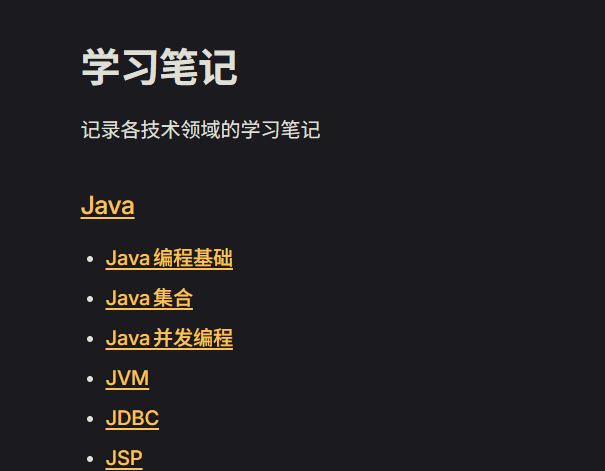
VitePress 提供了一个 createContentLoader 辅助函数来简化这个过程,该数据加载仅适用于 Markdown 文件。
创建文件 /.vitepress/data/posts.data.ts
import { createContentLoader } from 'vitepress'

export default createContentLoader('posts/*.md', /* options */)
在组件中获取数据
<script setup>
import { data as posts } from './posts.data.js'
</script>

<template>
  <h1>All Blog Posts</h1>
  <ul>
    <li v-for="post of posts">
      <a :href="post.url">{{ post.frontmatter.title }}</a>
      <span>by {{ post.frontmatter.author }}</span>
    </li>
  </ul>
</template>
常见问题
解析文章的标签未闭合
问题:Element is missing end tag.
解决方法:使用正则表达式 <[a-zA-Z][a-zA-Z0-9]*[^>]*> 搜索,逐个排查。